Buy & sell crypto on an exchange
Notes on using a crypto exchange:
Many old school users of crypto exchanges don’t leave their funds in the exchange for security, we send funds to the exchange, trade them and then withdraw them in real time as to avoid any un-necessary security risks.
Crypto exchanges often charge a commission to use them when you deposit, trade or withdraw to/from them these are usually at low commission rates, if you are after trading larger quantities of crypto it can be a good idea to compare these rates online while considering the security of the exchanges in question.
A strong password when creating a crypto exchange account, a mixture of upper and lower case characters and numbers as well as a password with 20 or more characters in is advised.
Sending your local currency from or to a bank account from/to the exchange then trading it online for another currency in the exchange can sometimes offset any overseas bank charges.
A big part of using crypto is the ability to trade them for other cryptos and other world currencies on an exchange.
This way folk can store cryptos in their crypto wallets to send and receive to/from others for payments of services and goods, they can mine (help create new crypto coins by processing payments) for a reward off the network and can then trade them for all other currencies on the planet at their convenience.
There are many crypto exchanges available here I will be focusing on one called Kraken.com as to explain how to use them.
Kraken (https://www.kraken.com) crypto exchange is a descendant of the infamous Mt. Gox crypto exchange which was the first crypto exchange created and widely accepted. Where Mt. Gox exploded or imploded depending on who you ask, Kraken learnt from their mistakes and doubled down all round on security. Kraken provides its users with the ability to trade real world currencies and crypto currencies on their website as well as provide their users with what is called ‘an API feed’. This is a live secure feed of data from the exchange that provides other systems like websites, internal bots and programs with that data.
The API feed from Kraken is able to provide a user’s:
Balances details of their cryptos and real world currencies they have available on there.
Current open and closed trade order details (History) a user has created.
Recent and current trade prices of the different cryptos and real world currencies that have been exchanged.
You can see an example of this data being used on the MySQLBot.com home page in the ‘8 train’ at the top of the page that is showing the last two Bitcoin and Bitcash prices of the exchange which are then both averaged out for the users and visitors to get a better idea of the current prices.
Registering on the kraken.com website is a fast, free and easy process that anyone can do by going to the https://www.kraken.com home page and clicking ‘Create New Account’ at the top right of the page and filling out the registrant details, confirming their email address and securing their account with a strong password, as to say with a mix of upper and lower case letters and numbers, where it’s always advised to use a password with 20+ characters in it as to aid the security.

Once registered on the exchange a user can check out the latest prices of the different currencies on the ‘Prices’ link at the top of the page, where they can add funds in any currency be it a real world currency or a crypto currency by clicking on the ‘Funding’ link at the top of the page, as well as trade those currencies on the exchange by clicking the ‘Trade’ link at the top of the page.
Direct bank transfers are available to send to a user’s account using online banking where it is worth noting that usually if a user sends their local currency from or to their bank account then no overseas fees are incurred, but it is always worth checking the details with the exchange and with your bank as to confirm this is the case before sending/receiving.
!!REMEMBER ALWAYS TO INCLUDE YOUR KRAKEN REFERENCE IN YOUR BANK TRANSFER TO THEM, THIS IS PROVIDED IN THE FUNDING AREA WHEN YOU CLICK DEPOSIT AND CHOOSE YOUR METHOD OF PAYMENT TO THEM, THIS ENSURES THE MONEY GOES TO YOUR ACCOUNT AT THE EXCHANGE!!
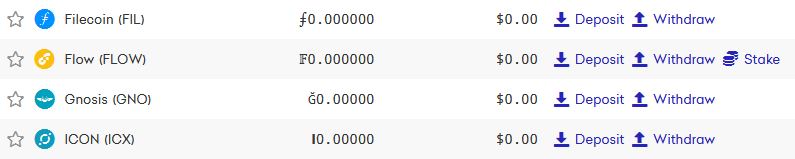
Crypto currencies can be sent to the exchange from a crypto wallet by clicking on the ‘Funding’ link at the top of the page, choosing from the list provided of the crypto coin type they would like to send to the exchange then clicking on ‘Deposit’ on the right hand side of the page that corresponds to that currency where they can then create a receive address to send it to.
Once an address has been created to receive the crypto on the exchange the address can then be copied and pasted in to a crypto wallet on the send option of that wallet where it can then be sent over to the exchange. The time it takes for the crypto to leave the users wallet and be sent to the exchange will depend on the transaction fee provided to the miners to process the transaction on that Blockchain as well as the time it takes the exchange to update the information on the exchange.
With funds having been added to the exchange be them real world currencies like the USD or the GBP for example or for a crypto currency - the user can then trade that currency for another in the ‘Trade’ section of the website.
On the ‘Trade’ page that is loaded by clicking the ‘Trade’ link at the top of the page a user can choose which currencies they want to trade from the lists available there where they can then specify the amount they would like to trade and whether they want to trade at current market rates or set a lower or higher rate depending on if they are wanting to buy or sell that currency.
If the user wants to trade at current market rates then the trade is often done very shortly after when another person trades that currency on the exchange, where when the user has specified a trade price for their trade then the trade will occur when the market price matches that rate.
Users are able to keep an eye on their current and completed trade orders (open and closed trade orders) by clicking the ‘History’ link at the top of the page where it will show the rates and quantities of the open and closed trades that are occurring/have occurred.
With the trades complete a user is able to with draw their traded currencies to their bank account or to their crypto wallets by going to the ‘Funding’ page where they deposited their initial currency to trade with and click ‘Withdraw’ next to the corresponding currency where they can then provide their bank account details to send it to their bank account or their crypto wallet address as to send it to their wallet.
With this a user is able to create a crypto account, deposit, trade, manage and withdraw all currencies on the exchange.
Enjoy your crypto trading.
Return to index | Crypto types (Blockchains)